 Skip to content
 3 min read
Product Spotlight: Rate Change Request
- Flexible pricing control: Site hosts can easily request adjustments to their charging rates at any time, giving them the flexibility to align pricing with local market conditions, energy costs, or business goals.
- Location-wide updates: Rate changes can be applied across all stations at a location in one go, saving time and ensuring pricing remains consistent for drivers.
- Seamless request workflow: The built-in request and approval process makes submitting, reviewing, and implementing rate changes straightforward, minimizing back-and-forth and reducing administrative effort.
What is this feature?
Through your Site Manager portal, you can now request updates to your charging rates in just a few clicks. Whether you want to apply a preset rate or request a custom one, the process is fast, easy, and transparent. You can even choose to apply the rate across all chargers at your location. It puts rate flexibility in your hands.
Real-World Use Cases for Rate Change Request
- A property manager wants to apply off-peak pricing across all chargers at a location.
- A retail site host requests a custom weekend promotion rate for increased foot traffic.
- A multi-unit dwelling adjusts pricing in response to energy cost fluctuations or tenant needs.
- A site host updates their rate template seasonally without contacting support directly.
How It Benefits Site Hosts
Gain more control over your EV charging strategy without jumping through hoops. Whether you’re managing pricing across a portfolio of properties or just need a quick update to stay competitive, this feature simplifies the process and keeps you in the driver’s seat.
How It Works
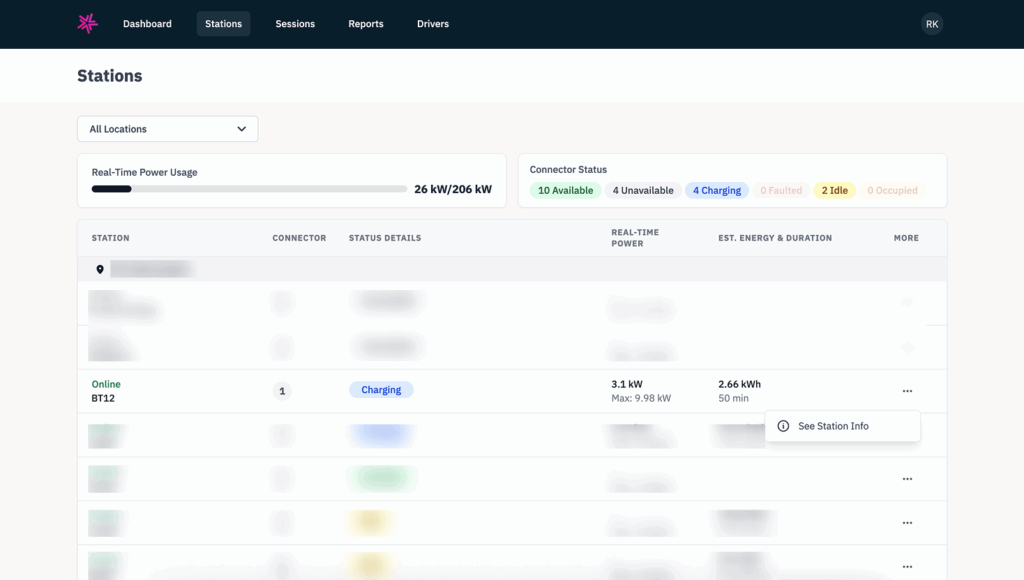
- Log into your Site Manager portal and select your location.
- Under a station, click on the three-dots icon.
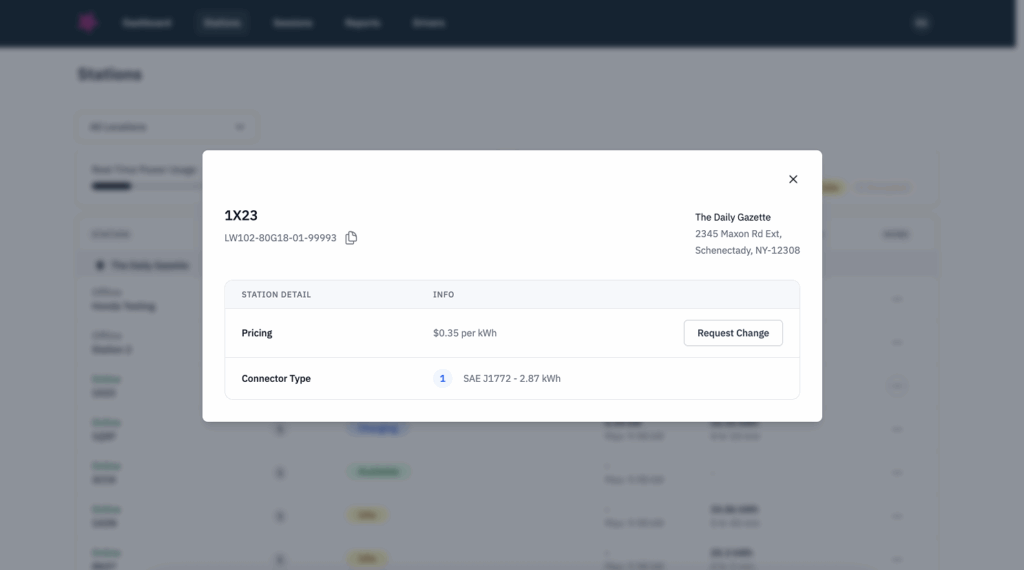
- Click on “See More Details”. In the modal, click on the “Request Rate Change” button.
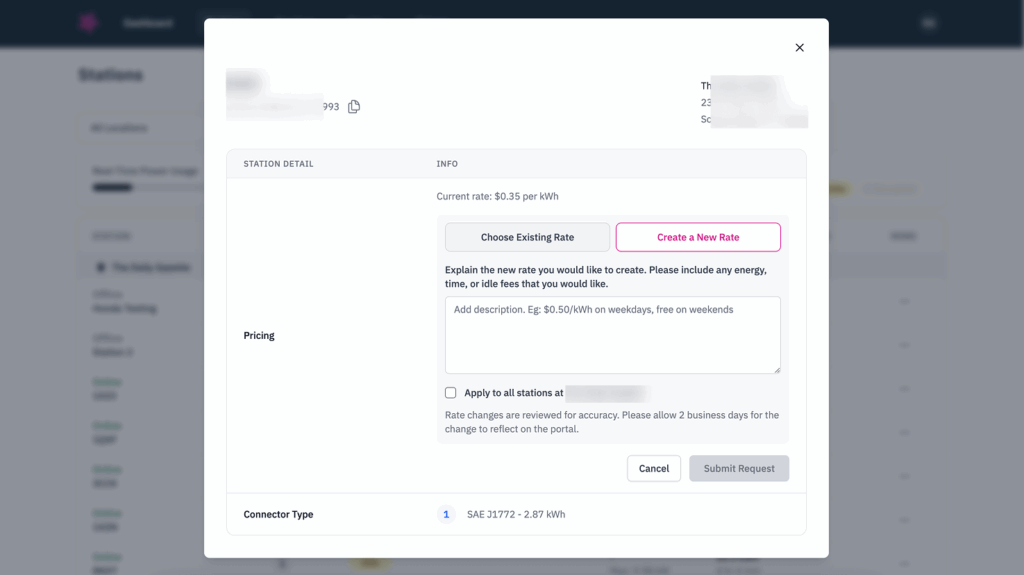
- Choose from a list of existing rates in our system or request a custom rate.
- Optionally, check a box to apply the update to all stations at your site.
- Submit the request and we’ll take care of the rest—your new rate will be live within 2 business days.

Why It Matters
Your charging rates are a key part of your revenue strategy—and this feature lets you make informed pricing decisions quickly and confidently. Whether you’re running promotions, adjusting to energy rates, or staying competitive in your market, you now have the flexibility to adapt with ease.
How to Get Started
Ready to take control of your charging strategy? Reach out to our team—we’re here to help you make the most of every charge.ellentesque quis sem justo vitae eget amet non gravida.
Related Insights
Discover news, perspectives, education and more from Lynkwell’s team of experts.
Product Spotlight: In-App Payment Retry
What is In-App Payment Retry? In-App Payment Retry gives EV drivers the ability to resolve failed or pending payments di…

Product Spotlight: Scan to Add a Card
Drivers using Apple iOS can now add their card details effortlessly with the “Scan card” feature in the ViaLynk mobi…
Product Spotlight: Revenue Rundown
What is Revenue Rundown? The Revenue Rundown on the Site Manager portal gives site hosts a clear, customizable view into…